Your API requests belong in files you own, next to your code.
Seeing what that code actually sends should not need an account or a server.
CallFlow is a VS Code extension. The free REST client keeps every
request as a plain .http file in your workspace — it
diffs in git and opens in REST Client if we ever disappear. Pro adds
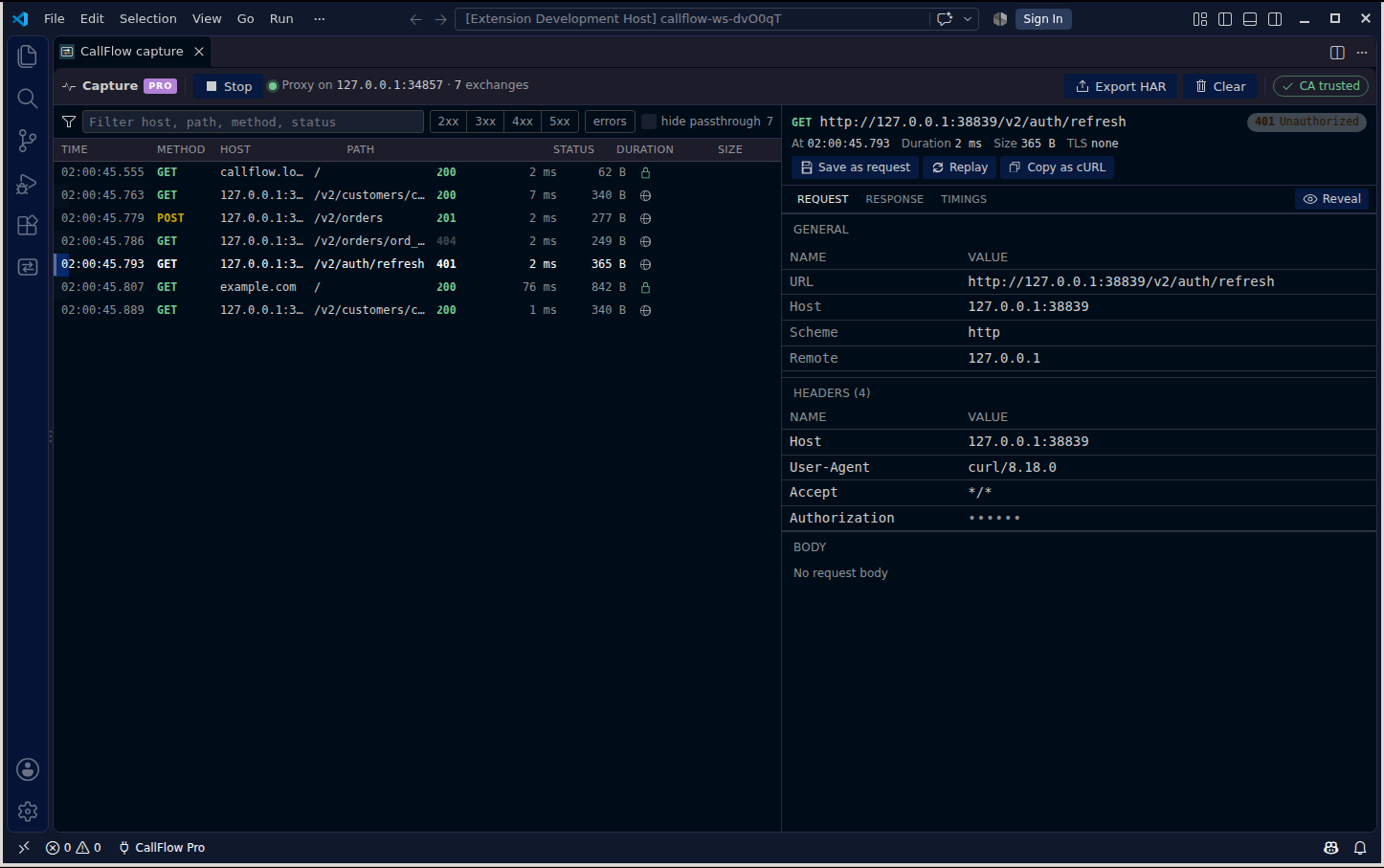
an HTTP debugger: start capture, and every terminal and debug session
in the workspace routes through a local proxy on your machine, so you
can inspect, save, replay and export the calls your code really made.
VS Code 1.90+ · Open VSX for Cursor and VSCodium · No account, no server, no telemetry.
How it actually works
Not marketing language — this is the literal request and capture path, because a "local only" promise is only as good as its mechanism.
-
A request is a
.httpfile, and nothing elseCollections are folders under
.callflow/in your workspace. Each file holds one or more requests separated by###, in the same format REST Client has read since 2016: method and URL, headers, a blank line, the body. There is no database, no proprietary bundle, and nothing that stops working if you uninstall the extension. The files diff in git like any other source. -
Environments keep secrets out of the file
environments.jsonholds your variables per environment. Any variable you list undersecretsis stored in VS Code'sSecretStorageinstead — the file on disk keeps an empty string, so a token never ends up in a commit. Variables resolve file-first, then environment, then dynamic values like{{$uuid}}, then chained values from an earlier response. -
Sending uses Node's own HTTP stack, so timings are real
Requests go out over
node:httpandnode:httpsdirectly, notfetch, which is what makes DNS, connect, TLS and first-byte timings precise and cancellation immediate. Redirects are followed up to ten times and theAuthorizationheader is never forwarded to a different origin. -
Capture (Pro) is a proxy on 127.0.0.1, scoped to your workspace
Start capture and CallFlow opens a proxy on a random port bound to
127.0.0.1only. It then setsHTTP_PROXY,HTTPS_PROXYand the CA-bundle variables that Node, Python, curl, Git, the AWS SDK, Deno, Cargo and Java honour — in this workspace's terminals and debug sessions, through VS Code's own environment mechanism. No system proxy setting is touched, nothing outside VS Code is routed, and stopping capture clears it all. -
The certificate authority is generated on your machine
To read HTTPS, CallFlow generates a local CA on first use and keeps the private key in VS Code's storage with owner-only permissions. For terminal targets you do not need to trust it system-wide, because the environment variables point each tool at the CA file directly. System trust only matters for GUI apps, and the exact command is shown before it runs, never behind a silent prompt.
Secrets are masked before they reach the screen
Captured traffic and history can contain the very things you would
not want on a screenshot. Values of Authorization,
Cookie, Set-Cookie and
X-API-Key are masked in the inspector and in HAR
export by default (the list is a setting), and you reveal them
deliberately, per view. Bodies are stored only in your own VS Code
storage and are never synced.
Pro licences don't phone home either
A CallFlow Pro licence is a small signed key that the extension checks entirely on its own, offline, using public-key verification. It never contacts a server to validate a purchase — not at activation, not afterward. That's a deliberate trade: we can't detect a copied key, but "the extension makes no network requests of its own" is a claim we'd rather keep true unconditionally than dilute with a phone-home check.
Free vs Pro
Free is the complete REST client, forever. Pro is the HTTP debugger on top of it — never access to your own files.
| Feature | Free | Pro |
|---|---|---|
| Request editor & response viewer | Included | Included |
Collections as plain .http files in your workspace |
Included | Included |
| Environments, variables & auth helpers | Included | Included |
| Import from cURL, Thunder Client, Postman v2.1 & HAR | Included | Included |
| Export your requests, history & captures (cURL, HAR) | Included, forever | Included, forever |
| Request history | 200 entries | 20,000 entries |
| Capture traffic from terminals & debug sessions | — | Included |
| Inspect captured requests & responses | — | Included |
| Save a captured call as a request | — | Included |
| Replay & edit-replay | — | Included |
| Scripting, tests & collection runner | — | Coming in v0.2 |
| Price | $0 | $20 one-time |
Buy CallFlow Pro — $20 One-time. Sold through Paddle. Key shown on screen after payment.
Exporting your own requests and captures will always be free
Not "free for now" — free on principle, for the life of the product. Part of why CallFlow exists is that the most-installed REST client in VS Code removed collections from its free tier in August 2025 and moved to per-user monthly pricing, while the free alternative most people fell back to has not had a release since August 2022. Your requests are plain files in your own repository, and exporting history or captures as HAR is free in every tier. Pro sells the debugger. It will never sell you the exit door.
What we can honestly say instead of "trusted by thousands"
CallFlow is pre-launch. There are no users yet, so there are no reviews, no install counts, and nothing here is going to pretend otherwise. Here is what we can state precisely, because it's true of the code today:
- The extension makes no network requests of its own. The only traffic it produces is the requests you send on purpose, and the traffic your own processes send through the capture proxy while you have it switched on.
-
Your requests live in
.callflow/inside your workspace, as files you can open in any editor. History and captures live in VS Code's global storage on your machine. Neither is synced, and there is no CallFlow server for them to be sent to — because there is no CallFlow server, full stop. -
The capture proxy binds to
127.0.0.1on a random port and is unreachable from any other machine. The CA it uses is generated locally; its private key is written with owner-only permissions and never leaves your storage folder. - There is no analytics SDK, no telemetry, no crash reporter, and no tracking pixel — in the extension or on this page.
- We — the people who make CallFlow — cannot see your requests or captures. Not "we don't look." There is nowhere for them to arrive.
- The one thing that does leave your machine is a Pro purchase, handled entirely by Paddle as the seller of record. See the privacy policy for exactly what that involves.
Get CallFlow
CallFlow is free on the Visual Studio Marketplace. Install it from
inside VS Code (search "CallFlow"), or download the .vsix
here for a manual install. Unlock Pro whenever you want the debugger.
Install from the Visual Studio Marketplace Download callflow-0.1.1.vsix
Works in VS Code 1.90 or newer. Open VSX (Cursor, VSCodium) is coming soon; until then the .vsix installs there via “Install from VSIX…”. Pro licences are sold through Paddle. Buy Pro — $20
FAQ
- Why build another REST client?
- Because the two people relied on stopped being reliable. Thunder Client barred companies from its free version in October 2023, cut free to three collections and no environments in February 2025, removed collections from free entirely in August 2025, and now charges per user per month; its Marketplace rating is 2.39 stars. REST Client, the free fallback, has had no release since August 2022 with dozens of pull requests waiting. Postman's extension requires an account. CallFlow exists so that a request editor inside your editor does not come with any of those conditions attached.
- Does CallFlow send my requests anywhere?
- Only to the URL you typed. The extension itself makes no network requests — no sync, no update check of its own, no licence check. Everything it stores is on your machine, and the exit is a folder of text files.
- Am I locked into CallFlow's format?
-
No. Requests are stored in the
.httpformat that REST Client and several other tools already read, with###separators and{{variable}}substitution. If CallFlow vanished tomorrow, your collections would still open, still diff, and still run elsewhere. - How does capture route traffic without changing my system proxy?
-
VS Code lets an extension add environment variables to the
workspace's terminals and to debug launch configurations.
CallFlow uses that to set the standard proxy and CA-bundle
variables while capture is on, and removes them when you stop.
Processes started outside VS Code are untouched, and
localhostcan be included or excluded with a setting. - Do I have to install a root certificate?
-
Not for terminal and debug targets: tools that honour
NODE_EXTRA_CA_CERTS,SSL_CERT_FILE,REQUESTS_CA_BUNDLE,CURL_CA_BUNDLEand similar are pointed at the local CA file directly. Trusting the CA at the OS level is only needed for GUI applications, is optional, and the command CallFlow would run is shown before you confirm it. - What can capture not see?
-
Anything that pins certificates, HTTP/3 (QUIC is disabled for the
launched browser target, so traffic falls back to HTTP/2 or
HTTP/1.1), gRPC, and Java processes that ignore
JAVA_TOOL_OPTIONS. Version 0.1 covers HTTP/1.1 and HTTPS from terminals and debug sessions; that scope is stated here rather than discovered after purchase. - How does this compare to Fiddler, Charles or Proxyman?
- Those are system-wide proxies and see everything on the machine; CallFlow is narrower on purpose and sees only what your workspace runs. Fiddler Everywhere requires an account and a subscription, and Fiddler Classic's licence became non-commercial on 3 August 2026. Charles is $50 and Proxyman $89, both one-time. If you need to capture a whole machine or a phone, one of those is the better tool; if you want the calls your code made, next to the code, for $20 once, that is what CallFlow is for.
- Does buying Pro create an account somewhere?
- No account with us. Paddle handles the purchase and delivery of your licence key. The extension verifies that key's signature locally and never checks in with a server afterward — so we don't know when, where, or how often you activate it.
- Does it work in Cursor, VSCodium or Windsurf?
- Any editor that installs from Open VSX or accepts a
.vsixfile, on VS Code engine 1.90 or newer. - Is the Pro price final?
- Yes. $20, one-time, sold through Paddle. No subscription, no per-seat pricing, no early-bird games, no countdown timers.
Compared honestly
Side-by-side pages with sources, including the cases where the other tool is the better pick.