Compared honestly · updated 2026-09-26
OneTab lost all your tabs. Here is why, and what a backstop looks like.
OneTab is a good tab shelf: two million people use it, and it is free. Its one weakness is the thing people search for after it happens. OneTab keeps everything in a single local store that is never versioned or verified, so when a Chrome profile is reset, a cleaner wipes extension data, or a write goes wrong, the whole list is gone with no trace. Backstop was built for exactly that moment.
- OneTab: one list, one copy, no version history, no check that a save actually landed. Uninstalling deletes everything, in their own words.
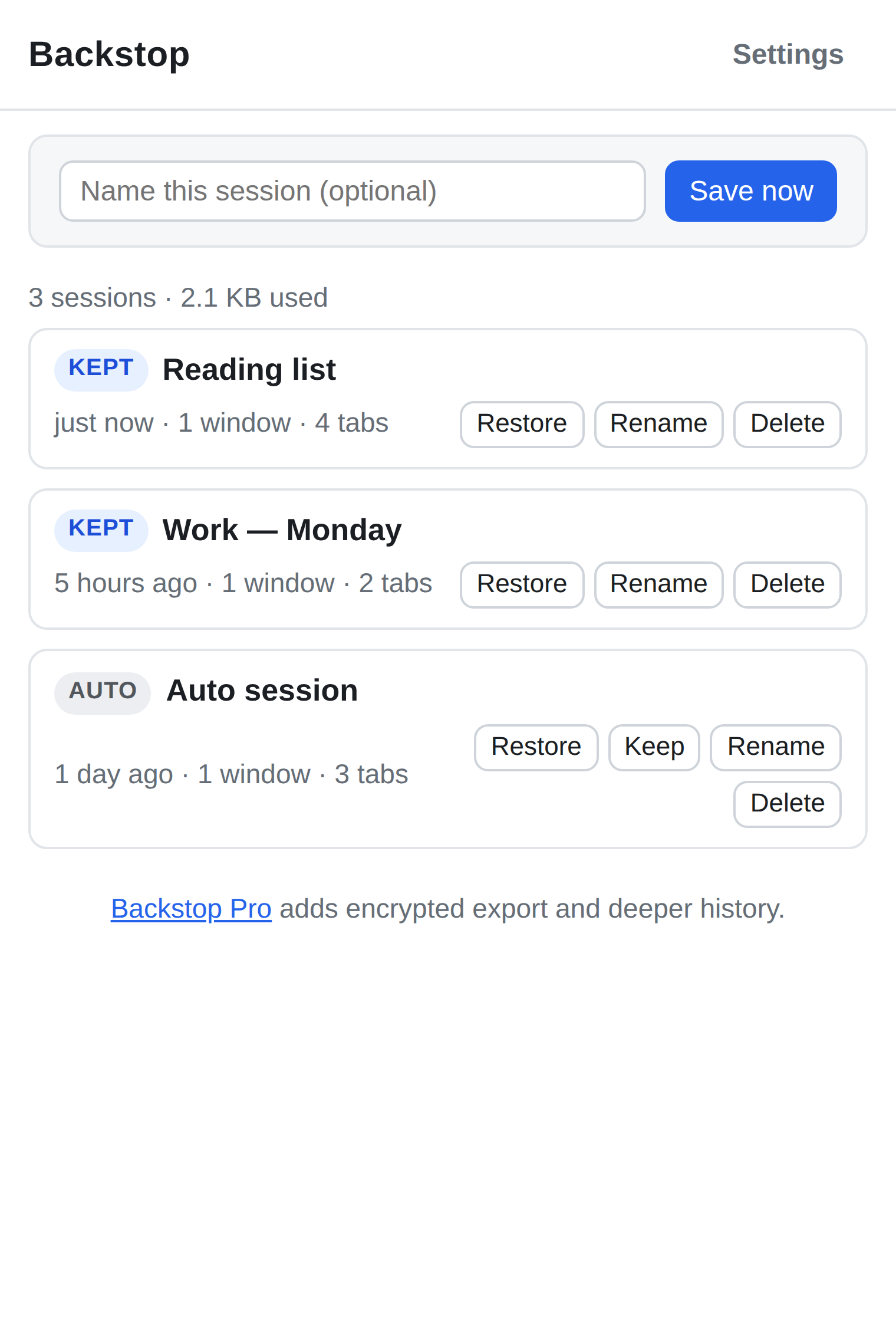
- Backstop: every save is a new snapshot under its own key, read back and checksummed before it is trusted, with automatic snapshots on a timer.
- Both are free, local, and account-free. Backstop Pro ($12 one-time) adds a deeper snapshot history and encrypted export. Plain export is free forever in Backstop.
OneTab vs Backstop, side by side
| OneTab | Backstop | |
|---|---|---|
| Price | Free | Free; Pro $12 one-time |
| Account required | No | No |
| Where your data lives | Local extension storage, one list | Local extension storage, one snapshot per save |
| Version history | None — the list is overwritten in place | Every save is a separate, dated snapshot |
| Verified after write | No | Read back and checksummed before it appears in the list |
| Automatic snapshots | No | Yes, on a timer (free keeps 10, Pro keeps 200) |
| Export / import | Plain export and import | Plain JSON export and import, free forever; encrypted export in Pro |
| Survives uninstall | No (their words: uninstalling deletes stored tabs) | No — same Chrome rule. Export first; Backstop reminds you |
| Telemetry | None declared | None. No host permissions, and the code makes no network requests |
| Permissions in the published manifest (read 26 Sep 2026) | favicon, unlimitedStorage, storage, tabs, activeTab, scripting, contextMenus; no host permissions | tabs, storage, unlimitedStorage, alarms; no host permissions |
| Sharing | Public share links | Not a feature |
| Browsers | Chrome, Edge, Firefox | Chrome, Edge, other Chromium |
Competitor facts were checked on 2026-09-26 against the sources linked below. If something has changed, tell us and we will correct it.
Where OneTab users get hurt
One copy, overwritten in place
OneTab holds your entire tab list in a single storage entry. Each change rewrites that entry. If the write is interrupted, the profile is corrupted, or a cleaner tool empties extension storage, there is no older version to fall back to. OneTab's own help page is candid about the uninstall case: "Uninstalling OneTab will cause your browser to delete your stored tabs."
"DO NOT TRUST IT... one day all my 15k tabs vanished."
"keeps resseting and deleting everything" — the OneTab team replied that this happens when privacy-cleaner software wipes profile data.
Sources: one-tab.com help · AlternativeTo reviews · Chrome Web Store review, Aug 2026
No way to know a save worked until it didn't
Nothing in OneTab reads the list back after writing it. The first time you learn that storage was silently corrupted is when the page opens empty. People have written their own backup scripts to work around this.
"one day, I opened up OneTab and all my links were gone." — README of a community-made OneTab backup tool
Sources: backupOneTab on GitHub · Hacker News, profile corruption wiped OneTab
Recovery depends on a habit you probably don't have
OneTab does offer export and import. But an export is a manual step, and most people only think of it after the loss. A tool whose safety depends on remembering to press a button is not a backup; it is a reminder.
What Backstop does instead
Backstop never overwrites a saved session. Every save, manual or automatic, is written under its own key. After each write it reads the snapshot back and compares a checksum before the snapshot is allowed to appear in your list. A bad write can only fail to add a new snapshot; it cannot corrupt one you already have. Automatic snapshots run on a timer so you have recent history even when you forgot to save.
It is the same shape as OneTab where it counts: free, local, no account, no server, no host permissions, and no network requests in the code. Plain JSON export and import are free forever on principle, so you can always leave with your data.
To be fair to OneTab
OneTab is lighter and simpler than Backstop, works in Firefox, and has a one-click shelf that Backstop does not try to copy. Its team now replies to reviews and its help page is honest about the uninstall case. If you have never lost a list and never will, OneTab is fine. Backstop exists for the day that stops being true.
Try Backstop
Free on the store. No account, no server, nothing uploaded. Pro is a $12 one-time purchase, sold through Paddle, and plain export of your own data is never paywalled.
Install from the Chrome Web Store Install from Edge Add-ons Read how Backstop works
Questions people ask
- Can Backstop recover tabs OneTab already lost?
- No. Once OneTab's storage entry is gone, nothing can read it back. If you still have OneTab open with tabs in it, export from OneTab now, then import the file into Backstop or keep it somewhere safe.
- Does Backstop upload anything?
- No. Backstop requests no host permissions and its code makes no network requests. It uses the tabs, storage, unlimitedStorage and alarms permissions and nothing else. There is no account and no server.
- What happens if I uninstall Backstop?
- Chrome deletes an extension's local storage on uninstall, the same rule OneTab describes. Export first. Backstop's export is plain JSON and is free forever.
- Is Backstop free?
- Yes. The free version saves, restores, auto-snapshots (keeping the last 10) and exports. Pro is a $12 one-time purchase that keeps 200 automatic snapshots, adds encrypted export and search across history.